
Sponsored by DroneDeploy —
Easily leverage drone data in Autodesk AutoCAD, ArcGIS, and other software
Elevation data is crucial to many industries. Businesses are beginning to look to drones as a faster, safer, more cost-effective alternative to traditional ground-based survey methods of capturing elevation data. Over the last few months, we’ve rolled out a number of tools to help companies leverage elevation data, including improved volume calculations, the ability to see the elevation of a particular point, and more. Today, we’re thrilled to announce the addition of two new powerful features to make the elevation data in your maps even more useful: the ability to visualize elevation profiles and to export contour maps.
Elevation Profile
Want to measure the slope of a roof, visualize crop height variability or see the highwalls of your mine in profile right from your map? Just draw a line between any two points on your map, and a line will appear in the side panel showing you the cross-section of the elevation data along that line, along with measurements of elevation and length that let you easily calculate slope.
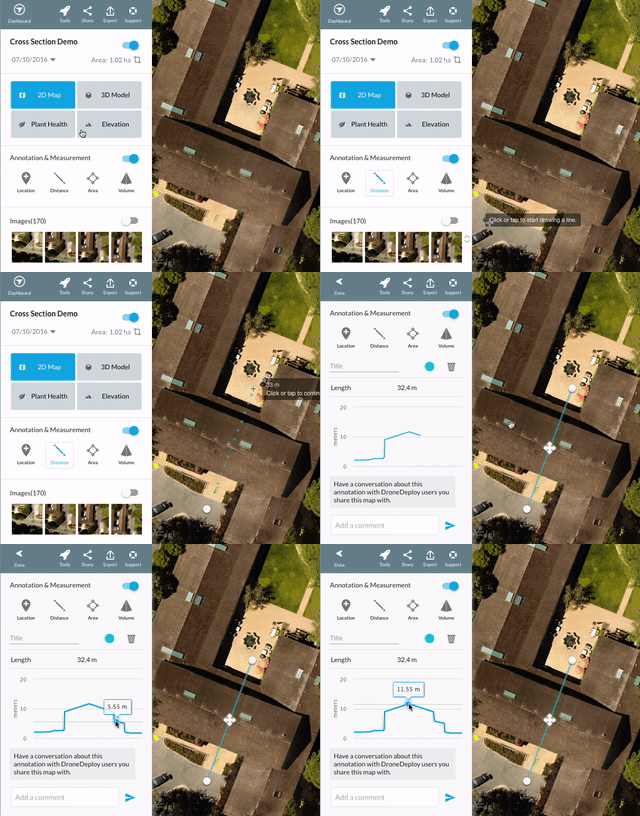
The elevation profile tool is available to all DroneDeploy paid customers and is part of the DroneDeploy free trial.
Contour Map Export
A contour map is a ubiquitous tool used for building and landscape design, construction and mine planning and more and is one of the standard outputs that surveyors deliver to their clients. To generate contour maps, surveyors traditionally use ground-based LIDAR stations to measure the elevation of thousands of points on the site in a painstaking, sometimes dangerous process that can take days or weeks.
Drones can capture much more detailed elevation data — millions of points — in a matter of minutes — but that can pose another problem. Many of the common software tools used to analyze elevation data and develop plans aren’t prepared to handle the volume and granularity of information contained in a drone-generated 3D model or point cloud.
In the past, to address this issue DroneDeploy users manually reduced the granularity of their DroneDeploy elevation data by converting their maps and models to contour lines using third party software. However, this process was time-consuming and complicated. Our users asked for a better alternative — and with the release of today’s new contour export tool, now there is one. It’s as fast and easy as a few clicks to export an accurate contour map with DroneDeploy in a format that can be easily imported to your software of choice.
Looking for more detailed elevation data? DroneDeploy also allows elevation data to be exported as a 3D model, point cloud, or GeoTiff with raw elevation values. Learn more about these export formats.
How to Export a Contour Map
To export a contour map, first navigate to the elevation data layer on your map and click “Export”.

Then, indicate the interval of the contour lines you would like to generate. Keep in mind that a more detailed, lower interval contour map will result in a larger file size.
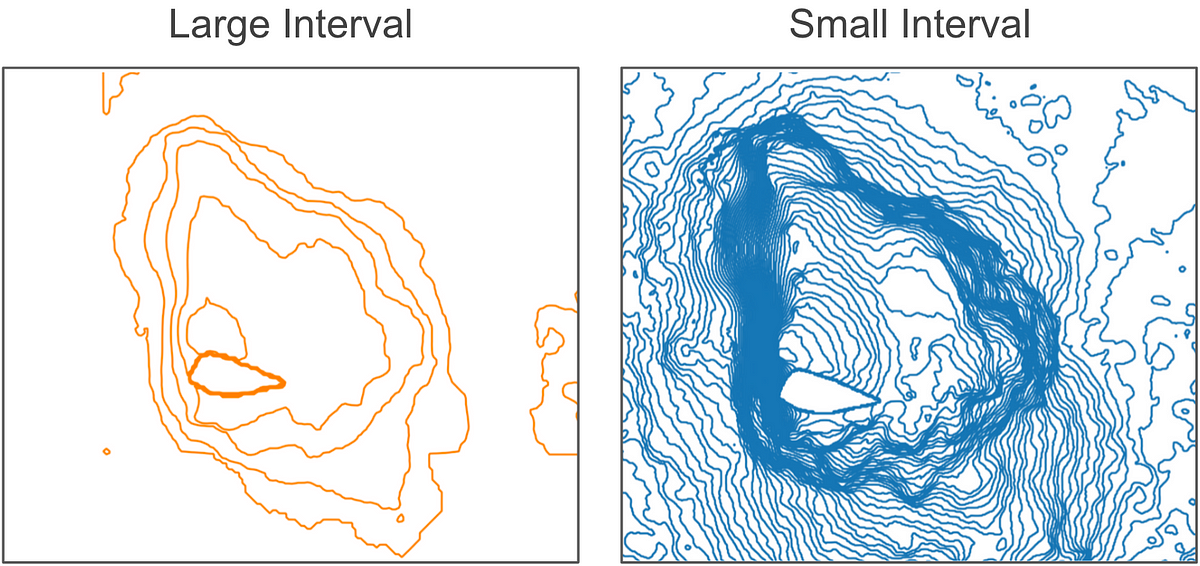
Finally, select the file format in which you would like to export your contour map. If you plan to use your contour map in ArcGIS, you’ll want to export as a shapefile (.shp). If you plan to import your contour map to CAD software, export as .dxf, an open-source equivalent to Autodesk’s proprietary .dwg file format.
Surface Models vs. Terrain Models
The new contour export makes it much easier to deliver professional-quality drone-generated survey maps. However, one important thing to note is that drones capture the elevation of the surface of the earth as seen from above, which may include trees, buildings and cars. DroneDeploy uses this data to generate a digital surface model, or DSM. By contrast, when a surveyor uses ground-based equipment to capture elevation data, he typically measures the elevation of the ground or terrain — not intervening trees or structures — to generate a digital terrain model (DTM). For design and planning purposes, a terrain model is typically more useful than a surface model. When the area mapped is bare earth, such as at a quarry, the surface model and terrain model may be virtually identical and drone-generated contours may be very useful, but in other cases, converting a surface model to a terrain model may require additional data manipulation to remove non-terrain features.
Relative Elevation and Accuracy
Before starting a flight to generate a contour map, you’ll also want to consider whether the contour lines should be relative or absolute values. By default, elevation data in DroneDeploy is expressed in feet or meters relative to the drone’s point of take-off. If you want to see elevation expressed as absolute distance above or below mean sea level, you will need to use Ground Control Points (GCPs), which are available in our Premier plan.
Using DroneDeploy, Bon Air Drone beats two competitors in side-by-side comparison
More and more companies in mining and other industries are planning to incorporate drone-based aerial surveys into their operations, particularly with the new, less restrictive Part 107 regulations going into effect later in August. Many of them are wrestling with one big question: whether to hire third-party drone service providers to perform aerial surveys or whether to bring drone operations in-house.
In this case study, we hear why one mining company decided to hire drone service provider Bon Air Drone to monitor excavation and hear how they benefit from Bon Air’s expertise and commitment to accuracy.
Bon Air Drone

We spoke with Kyle Falwell and Shelly Engel to learn more about Bon Air Drone and how they use DroneDeploy.
Kyle is a third-generation aviator and licensed commercial pilot with over 5,000 flying hours and owner of Bon Air Brokerage, an aircraft sales, management and services company based in Lynchburg, VA. A few years ago, he recognized the opportunity to use drones for aerial surveys and started Central Virginia Aerial Solutions, a UAS photography and videography company. Within a year, the business expanded outside of Virginia and the company rebranded as Bon Air Drone.
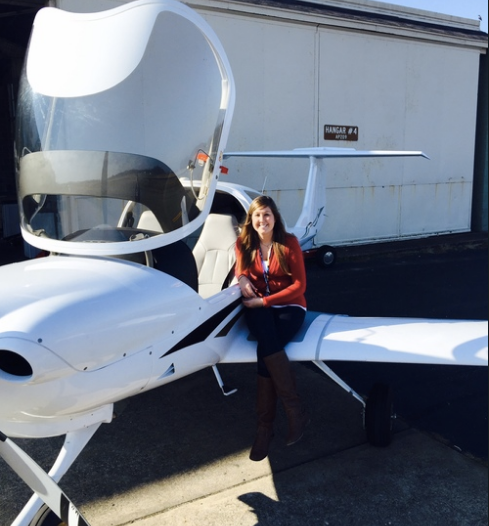
Shelly grew up as an Air Force kid and got her pilot’s certificate at 18. Now she’s a co-owner of Bon Air Drone, a licensed commercial pilot and FAA Qualified UAS pilot. She’s also a GIS software expert and brings an exceptional attention to detail to convert maps in DroneDeploy into the specific formats requested by clients.
“Everyone’s been blown away by the quality of the orthomosaics from DroneDeploy compared to what they’ve gotten from their traditional aerial photography,” said Kyle.
“Our top priority is the quality control side of it. There are a lot of people out there doing aerial surveys, but we want to hang our hat on accuracy.” He attributes much of Bon Air’s success to quality and attention to detail — and in some cases, like the one discussed below, demonstrating accuracy wins them customers.
Fy in-house or hire a third party?
Down the road from Bon Air Drone in Lynchburg, VA, is a quarry owned by a century-old, family-owned mining and aggregate company.
Geographic information is a vital component in many elements of their mining operations, but collecting this data using traditional, ground-based methods can be time-consuming, expensive, and pose safety risks. The quarry was intrigued about the possibility to use drones to capture this data more quickly and efficiently.
Initially, the quarry looked into performing drone-based aerial surveys themselves. After evaluating a couple of different drone companies that could supply them with drones, they realized that setting up in-house operations would be more challenging than they initially thought — especially in light of one particular challenge: the quarry is within a mile of Lynchburg Regional Airport. Instead of taking on the potential liability of operating so close to an airport themselves, they reached out to Bon Air Drone to see if they could help.
Before awarding a long-term contract, though, they asked Bon Air to demonstrate the quality of work they could provide by generating a contour map of a 36 acre portion of the 325-acre quarry. The test: to see how closely Bon Air’s map would match their own records, based on ground-based surveys.
Cleared to Fly
The first step in the project was to get clearance to fly Bon Air’s DJI Inspire drone at the quarry. This was no easy task. Not only did Bon Air have to file Notices to Airmen (NOTAMs), they also established two-way communication with air traffic control and the manager at the nearby airport. But that wasn’t all. Since the site was within a mile of the airport, the drone’s geo-fencing software also prevented them from flying. Bon Air had to contact the drone manufacturer, DJI, to demonstrate that they had clearance from the FAA and the airport to fly and ask them to lift the geo-fencing restriction.
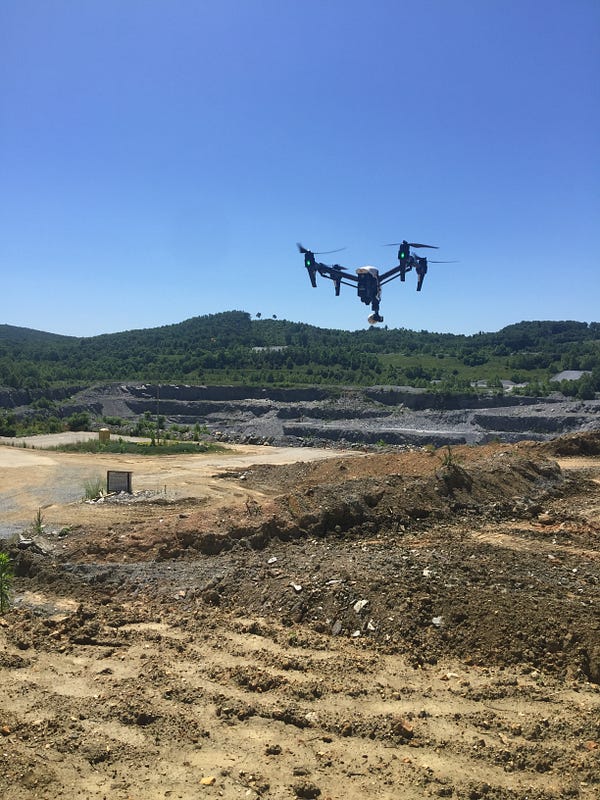
Before the drone flight, there was one more step to complete. In order to generate as accurate a map as possible, Bon Air’s surveyor, Ed, went on site to set up ground control points (GCPs). A ground control point is a marker on the ground with a precise, known, geographic location (typically measured using a GPS base-station) that will be visible in the map. These visible points, combined with the accurate GPS data, can be used later to fine-tune the accuracy of the map.
Finally ready to fly, the team planned their flights. They flew two flights with the Inspire in two, perpendicular grid patterns, both at 90% overlap, a strategy that Bon Air has found highly effective for making accurate 3-D models of terrain.
Tip for 3-D models: Want to make a 3D model not of terrain, but of a tall, man-made structure, like a building? When mapping structures, many operators find it helpful to include images taken from orbital flights with the camera pointed towards the object of interest rather than straight down. Learn more about this technique.
Precise Processing
Once the flights were complete, Shelly uploaded the imagery to DroneDeploy. “Within the same afternoon, we went from the quarry, back to the office and created a 3D model by the end of the day,” she Shelly. To increase the accuracy of the initial model the GCP data points were added via DroneDeploy.
Once the data had been fully orthorectified, Shelly exported the elevation data from DroneDeploy in the quarry’s local EPSG projection and used third-party software to generate contour lines and overlay them on top of the DroneDeploy orthomosaic.
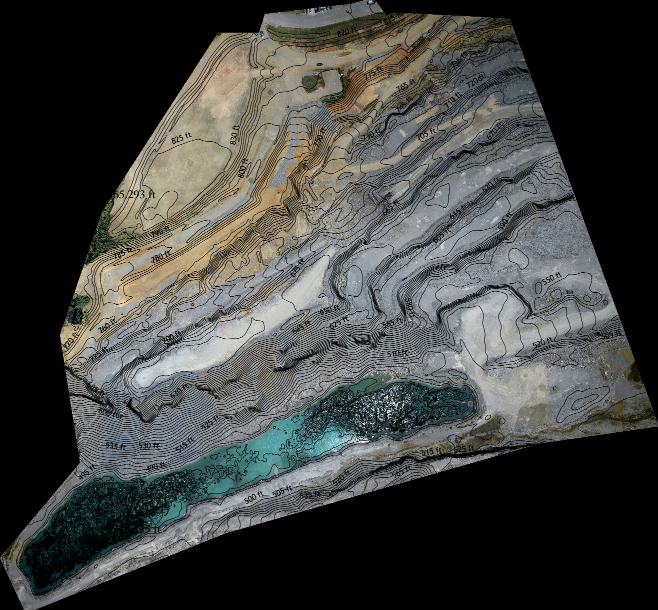
Shelly’s current process for generating a final contour map is complex, requiring technical proficiency in multiple systems — but with the release of DroneDeploy’s new contour export, it’s about to get a lot simpler.
She’s so excited about using DroneDeploy to directly generate contours, that she’s been helping to beta test and refine the new contour export tool.
“The quality of the orthomosaics and the 3D models as well as the accuracy we’ve seen from DroneDeploy — that’s why we’re excited about the contours. It’s gonna be really great,” said Shelly.
Showtime
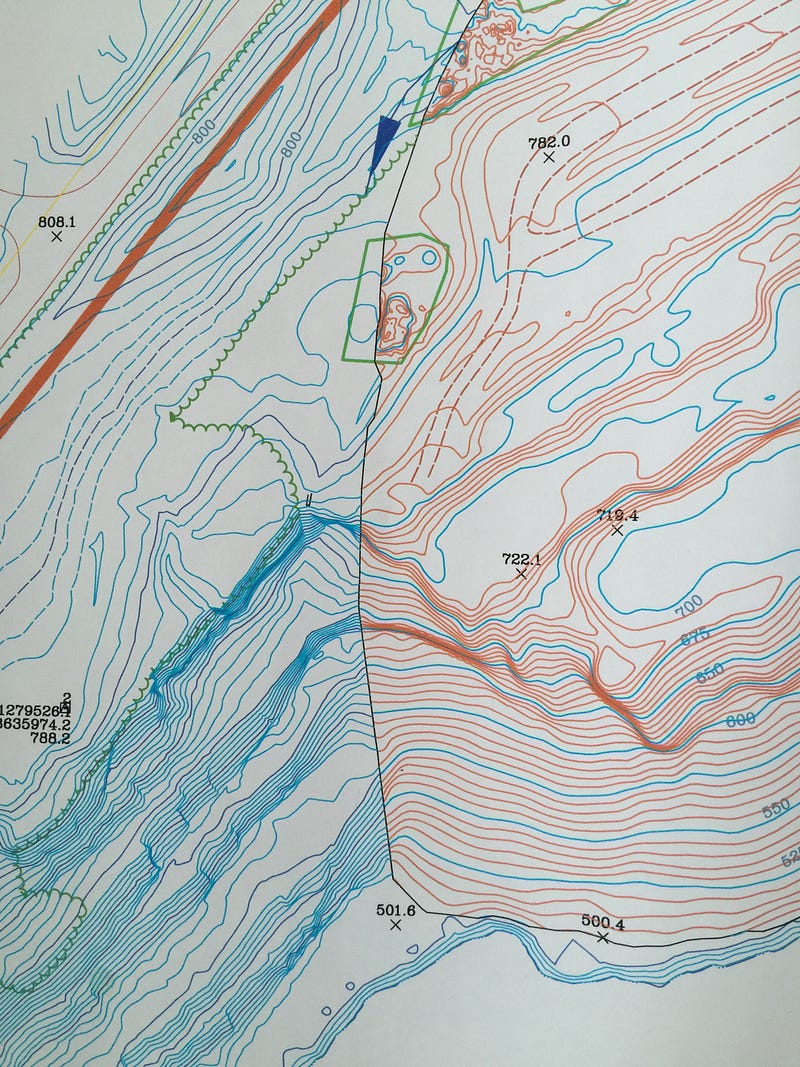
When Bon Air delivered the contour map, the quarry compared it side-by-side to their existing contour map, generated using ground-based survey maps — and to the demo surveys made by the two drone companies that had pitched them previously. It was no contest. “Our contour lines matched exactly with their ground-based contours,” said Kyle.
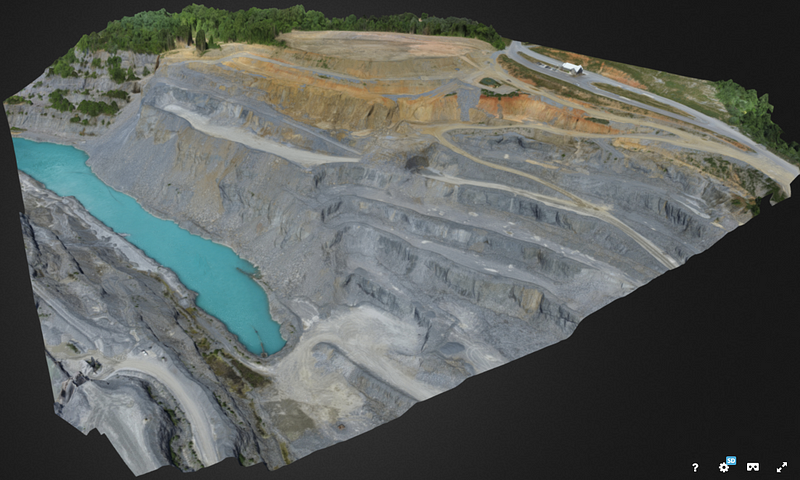
Then Kyle showed them the 3D model. “The quarry guys were blown away by the 3D model produced by DroneDeploy,” said Kyle. “They wanted to see the scaling on the rock — and we were able to zoom in and see it.”
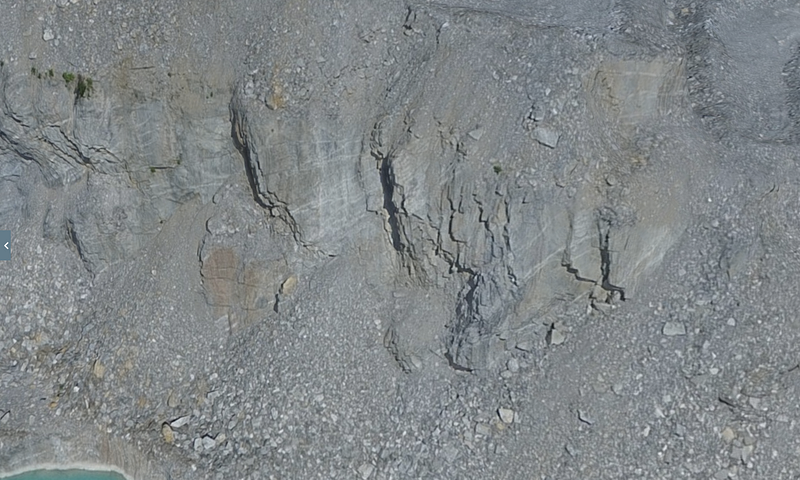
A high-resolution visual record is a big help for monitoring and compliance. “They have certain parts of the quarry that get inspected on a yearly basis and having the 3D model could allow them to do the inspections by video instead of having to come out to the quarry,” said Kyle. “The other thing they’re interested in is keeping the 3D images on file so that if the regulatory people come in and say this rock face might be an issue here, they can go back to the history of it and show that this face hasn’t changed in two years. It will give them historical data to reference in a visual way.”
And the cherry on top: Bon Air delivered the data in a format that could be easily and seamlessly imported into Carlson Mining Software, which the quarry uses to manage their geographic and elevation data.
All of this — for ¼ to a ⅓ of what the quarry would have spent to capture the data using traditional methods.
Scaling Up
Thanks to the success of this initial project, Bon Air signed a 3-year contract to map the quarry approximately once a month to monitor the amount of material that the quarry’s contractor has excavated from the area. And there’s big potential for the two companies to deepen their relationship and expand the uses for aerial surveying over time. In addition to the Lynchburg quarry, the mining company has many other active quarries, as well as stockyards with stockpiles of material that could be easily inventoried using drones.
Instead of building out and managing all of the complexities of a drone operations team, the mining company can simply request data from Bon Air, and receive high quality, accurate data back, without having to worry about everything that happens in between. “Surveyors want to use this technology,” said Kyle, “but they don’t know how to do it, how to process it, the airspace side of it, the liability and everything else that can come with it. They don’t want to touch it, they want to outsource it.”
As Bon Air grows their business, they need partners to help them scale and streamline their processes. “DroneDeploy does such a fantastic job with the user-friendliness of it, you can just upload the data and the processing is done for you,” said Kyle. “Compare that to months and months of training on specific software to get proficient and then years to be an expert.”
Today, Bon Air relies on DroneDeploy for fast, accurate and reliable map processing, but that’s only the beginning. Kyle envisions a future where DroneDeploy is the easy-to-use tool for almost all of his drone operations, from initial planning to delivering the outputs his clients need — and the new contour map export is an important step towards that future.
By Anya Lamb, Marketing Manager @DroneDeploy
Where to Learn More
Explore our support center to learn more about how to use some of the tools and features discussed above, including:
Try the Contour Map Export
The new contour export feature is available on the Business and Premier plans of DroneDeploy, starting at $249/mo. Request a consultation to speak with one of our sales representatives and find out which plan is right for your business.
Just getting started and not quite ready to generate contour maps? Sign up to start your free trial of DroneDeploy Pro today.

Frank Schroth is editor in chief of DroneLife, the authoritative source for news and analysis on the drone industry: it’s people, products, trends, and events.
Email Frank
TWITTER:@fschroth






Hi iam Landsurveyor and architect on the island Sint Maarten i will like some more info your product and what type of drone are best for survey work, i need to do land survey and under water survey mapping … regards