 DJI has always described their UAVs as flying cameras rather than drones. Delivering packages or gathering crop data has never been the company’s mission. DJI is about capturing the best aerial picture possible and nowhere is this mission more clear than in the DJI Go companion app for the Inspire 1, Phantom 3 line, and Matrice 100.
We had our first exposure to the DJI Go app when we set out to do our initial Phantom 3 review and immediately after opening the app on a phone we knew we were going to need a separate post to talk about the app.
At first glance, it’s totally overwhelming. There are so many settings, buttons, and features, your Phantom’s battery will be dead long before you get a chance to look at them all.
As such, we thought it would be helpful to start at the beginning and go through the app feature by feature, button by button.
Before we dive in, a disclaimer: We are not professional photographers. A lot of the settings and features are intended for (and therefore are only going to be understood by) people with a background in professional photography. We will do our best to at least mention these features, but we will stick to what we know, which is drones.
 Ok. Here we go.
Of course, you can buy any of DJI’s drones right in the app.
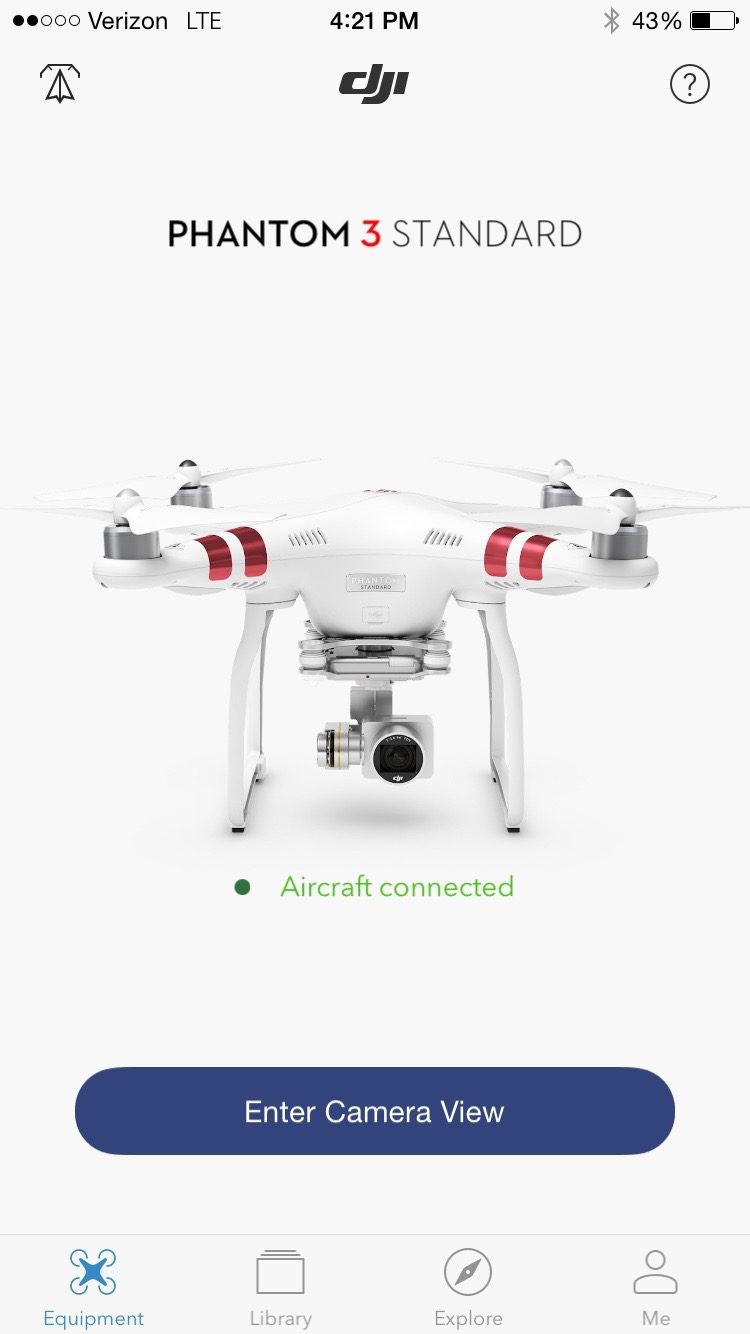
When you first open the app, there are step by step instructions explaining how to connect your particular drone.
At the bottom of the home screen is a menu bar that also has buttons for your personal media library (stored on the SD card in your drone) and an online media gallery that showcases photos and videos other DJI operators have captured with their drones and uploaded to SkyPixel and YouTube.
There is also a useful tutorial video that demonstrates how to edit and share videos right in the DJI Go app. I won’t go into all the functions, but the editing tools are extensive. You can extract any number of clips from your collection of aerial footage, edit their individual settings (speed, contrast, brightness, etc.), overlay some royalty-free music, and string them together into a movie. This is a really useful feature if you want to create a short compilation of your favorite shots, to share quickly on social media, but I found it frustrating that DJI confines you to set time limits on your compilation videos and you can’t cut up your individual shots (you are only allowed to take one clip from a single shot to use on your compilation). Again, this is a neat feature that is more of an extra than a necessity, so I shouldn’t be complaining.
The tutorial is incredibly succinct and deserves a quick watch when you open the app – if for no other reason than it will inspire you to create a film worth watching… In fact, I just watched it again for the writing of this post and now I have to go fly again.
Be right back.
You know what, watch the tutorial while I am gone:
Ok, I’m back.
The final button on the bar at the bottom of welcome screen is simply your DJI profile which includes links to the DJI Forum, store, and settings.
And the very last feature of this screen is your flight log which can be accessed by tapping the little paper airplane icon in the top left of the screen. The stats this screen keeps track of, like total distance you have flown and total time you have spent flying are a cool inclusion, but don’t serve any real purpose.
Camera View
Of course, the main reason you will be using the DJI Go app is to watch your drone’s camera in first person.
As previously mentioned, this is where the app can get a little overwhelming. Fortunately, DJI includes a very helpful overlay of the user interface when you first open the screen.
Actually, there are three overlays because there are so many icons on this screen:


If I tried to address every bubble in those three images, I would be here for the rest of the week and precisely zero people would read this whole post so I will quickly touch on the most important/least obvious ones.
Flight Mode. The Flight Mode button makes it really easy for first time flyers to get acquainted with the whole system. The app defaults to beginner mode, which keeps the drone from flying more than 200 meters away. You can edit the parameters of Beginner Mode or just switch out of it to remove any limits on where you can fly but, when you do, you get a popup warning reminding you not to fly over 400 feet above ground level and to stay away from airports.

Aircraft State. Easily the most frustrating part about flying Phantom 2s was getting the GPS calibrated properly. Fortunately, the new DJI Go app does away with the awkward rotations that characterized the Phantom 2 and automatically calibrates the GPS, so long as you are within range of a WiFi signal. You may have to rotate your phone to get proper calibration, but it’s considerably easier than rotating the whole drone.
Auto Takeoff. Very quickly let me just mention that I tried the Auto Takeoff feature once. The motors spun to life and then my Phantom 3 Standard promptly tipped over and broke two props. So approach this feature with caution.
Compass Mode. The compass mode is a way to track your drone’s location when it’s out of sight via a Google Maps-like interface. However, this feature looks like DJI Ground Station -the app that allows you to plot a flight path and have your Phantom fly it autonomously- but functions nothing like it. This was a disappointing surprise when we discovered it. Also, the image it uses as a map view is at least five years old. So, I wouldn’t rely on Compass Mode as a navigation tool, for fear of running into a building that didn’t exist in 2012.

Now, I am not a professional photographer so I would just make a fool of myself if I tried to nitpick every little camera setting available through the DJI Go app.
But let me just say this: These features are numerous and extremely detailed. Aspect ratios, format options, shutter settings, filters and exposure adjustments are all at your fingertips in this app. So, do yourself a favor and play with these settings while your drone is on the ground because if you are trying to finetune your image capture while you are in flight, your battery will be dead faster than you say “sepia.”

Alan is serial entrepreneur, active angel investor, and a drone enthusiast. He co-founded DRONELIFE.com to address the emerging commercial market for drones and drone technology. Prior to DRONELIFE.com, Alan co-founded Where.com, ThinkingScreen Media, and Nurse.com. Recently, Alan has co-founded Crowditz.com, a leader in Equity Crowdfunding Data, Analytics, and Insights. Alan can be reached at alan(at)dronelife.com




I like this post – thanks. Would it be any different if updated and applied to MAVIC Pro?
I have finally worked up the nerve to turn off the beginner mode. Now I need the camera more than ever. I am not camera savvy and am no computer geek.
Also am a AARP member (old guy). Where, and how, do I make the picture brighter on the mobile device App. I have a picture but it is so dark on the ground view, it is hard to pick up images clearly.
Got it! No where, in what little information was included with the Phantom 3, did I see anything about a clear protective cover on the camera lens that was supposed to be removed. My Bad. Jim P.
For P3 Standard – I had problems after the firmware upgrade. I coud not get the RC to resync with the aircraft no matter what I tried. I finally was successful. The problem ? The RC and aircraft have to be absolutely 100% charged. Not 50% not 80 %, but 100%. And use the sync facility that is available in the GO App.
Can u explain how to remove the beginner flying of the drone?
Thanks!
So we all just ignore the guy who says his drone has been crippled by the firmware update and he no longer has any range?
Ho andrew, i also use the auto takeoff fro. The dji go apps and happen exactly what you describe, is there any damage in the motor?
Don’t buy all of the Hype! I have had a P3 Pro for over a year now. I flew all over my 400 acre ranch checking deer, cattle and water. Now I can’t get the drone but a little way from the house. It is useless. I get the NFZ display and it stops dead. I live 17 miles out of a small town, all ranch land around here. Only small grass landing strip belongs to a friend of mine and is approximately 5 miles away. Now it doesn’t make sense to own this thing.
email flysafe@dji.com and they can unlock the zone for you.
Does the app have advertising?
No ads.
I see DJI ads every time I open the app.
What a great read I a dji p3 Advance and I think it is great
The only 2 things that I cannot get around is that the glmble will not go 30% up
Some times when I put the APP on the camera screen is all pixelated
App download at 01-04-16
Hi Peter
In the DJI GO app menu, click on the Gimbal icon, then click on Advanced Settings.
You can setup 3 different configurations. Choose one and then turn on “Enable Upwards Gimbal Tilt Limit to 30 Degrees”.
This is off by default so the props don’t appear in the video.
I’ve owned Phantom 3 Pro about a week and I’m overwhelmed by the features of the Dji Go app. There is so much I can do with it, it will probably take me a.few months to learn it all, if then.
I really love the DJI GO app. Sure, some improvements could be made, but features such as Auto Takeoff just make it purely awesome!
I have a new Phantom 3 Standard drone and theDJI GO App will not connect to the controller or the drone. its connected to wifi I think but not sure how to complete the process. Can you please helpmeet ?
the remote and drone is already synced together. You’ll have to go into the settings of your mobile device and go into your wifi. the network you should see will say PHANTOM3_ with some odd numbers. the connection is just between the remote and drone with your mobile device. I had a hard time as well when I got my drone but youtube seems to always have answers. lol. hope this helped. safe flying 🙂