
• Skip to main content
  • Skip to secondary menu
  • Skip to primary sidebar
  • Skip to secondary sidebar
  • Skip to footer
  • DroneRacingLife
  • DroneFlyers
  • Newsletter
DroneLife

DRONELIFE

Stay up to date on all the latest Drone News

  • News
  • Products
  • Industries
    • Agriculture
    • Construction
    • Delivery
    • Dual Use
    • Inspection
    • Public Safety
    • Surveying
  • Enthusiasts
  • Regulations
  • Business
  • Video
  • Podcasts

4 Steps for Making an Excellent 3D Model With a Drone

March 31, 2016 by Frank Schroth 5 Comments

Sponsored by DroneDeploy —

Jeff Foster, an expert in 3D modeling, share his best practices –

As we found in our Commercial Drone Industry Trends, more and more people (30% of our users!) are using drones to make 3D models. It’s simple to make a 3D model with DroneDeploy, and in fact, every map includes a 3D model view — but to make a high-quality model that looks great from every angle, there’s a bit more to it.

To help you learn how to make better 3D models, we talked to an expert and asked him to share his tips and tricks.
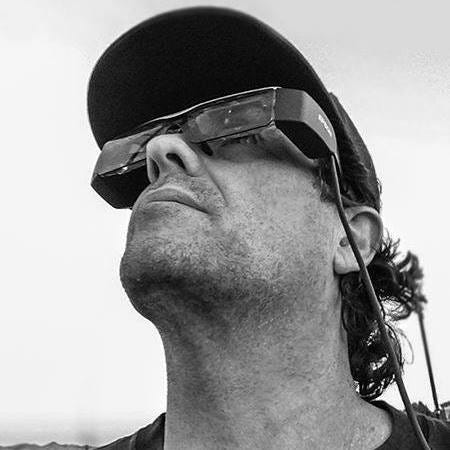
Jeff Foster, Co-Founder of Sound Visions Media and Editorial Director of Drone Coalition is no stranger to 3D modeling. He’s been doing 3D modeling, rendering and animation since the early 90s and has even written 10 books on the subject. In 2012, Jeff was working with the Pro Video coalition writing articles on GoPro cameras when he was contacted by DJI to review their new drone. He got one, took it out, and thought, “this changes everything”.

When he first began making 3D models with his drone, Jeff used desktop software to process the imagery. Then he found DroneDeploy.

“It’s so much faster and cleaner. The models themselves, and to be able to show them to people with the link — have just been phenomenal.” — Jeff Foster
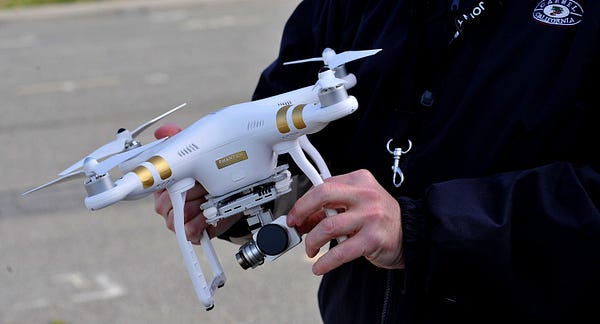
Today, Jeff flies a DJI Inspire 1 with X3 and X5 cameras, as well as a DJI Phantom 3. In this blog post, Jeff will walk through the steps he took to create a 3D model of the abandoned Navy dorms on Treasure Island, near San Francisco, using his Phantom 3 Professional drone.

Step 1: Pick a Time to Fly

According to Jeff, one of the most important steps in using your drone to make a 3D model is to pick a good time to fly. Besides avoiding high winds or rain, it’s also important to pick a time with good lighting.

“If it’s an overcast day, that’s best because there aren’t strong shadows”, said Jeff. “I usually pick sometime around noon where there are the shortest shadows possible, but you don’t always get a chance to choose that.” [Click to tweet]

The worst time of day? Too early or too late in the day because that’s when the shadows are longest and will have the greatest affect on the outcome of the model.

When flying at the abandoned Navy dorms, Jeff flew around 10am on a partly-cloudy day.

Step 2: Capture Nadir Imagery

Jeff likes to start by capturing nadir imagery, photos captured from directly above looking down, using the free DroneDeploy flight app (iOS or Android). He simply outlines the area he wants to fly on a base layer map, and the app generates a flight plan. Following a safety check, the drone automatically takes off, flies along the automated flight path capturing images and then lands.

“I’ve been flying for a few years and other mapping software that I’ve played with is a little scary because it doesn’t always do what you expect it to do. The DroneDeploy flight app has been really solid — it’s really phenomenal.” — Jeff Foster

Step 3: Circle the Structure to Capture Oblique Imagery

If you’re making a 3D model of relatively flat terrain, an overhead flight might be sufficient to make a good model. However, if you’re modeling a structure or rock formation with steep, vertical or concave sides, overhead images don’t capture a good view of the sides of the structure. For this reason, Jeff recommends flying two additional orbital flights around the structure capturing oblique imagery to improve the quality of your model. [Click to tweet]

“Getting the manual oblique images, in addition to the automated ones on top, gets me a lot better results than just shooting from the top” — Jeff Foster
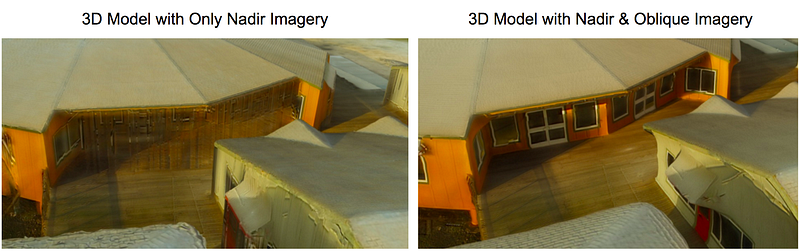
Inclusion of oblique imagery in the 3D model on the right dramatically improved model quality compared to the model on the left.

Jeff captures manual obliques by tilting the camera 45 degrees and flying around the structure at a fixed radius at the same altitude as the original nadir flight. “Then I’ll come down about half the altitude and angle the camera close to 90 degrees and circle the structure again,” said Jeff.

When capturing oblique images it’s important to avoid capturing the horizon within your images. When Jeff makes these two orbital flights, he manually triggers the camera shutter to take each picture. However if you’re just starting out, you might experiment with flying very slowly and setting the camera through your drone’s flight app to automatically capture images every 3–5 seconds.

In some cases, where the structure is more intricate or includes overhangs (such as the eves on a house), Jeff may even do a third — possibly handheld — orbit from an even lower angle, pointing the camera up to 90 degrees.
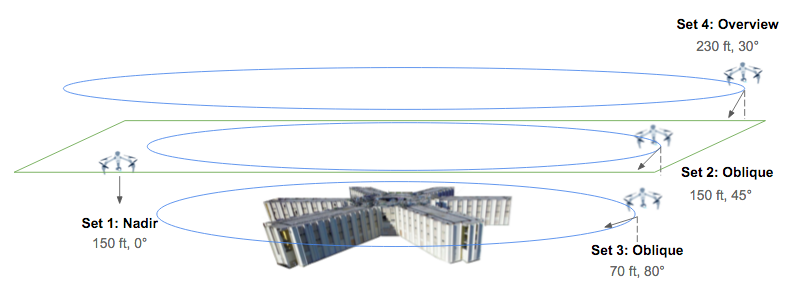
Diagram showing the four flights made to model the abandoned Navy dorms

At the abandoned Navy dorms, Jeff made three additional flights to capture oblique imagery. One at 150 feet with the camera angled 45 degrees, and another at 70 feet with the camera angled at approximately 80 degrees. Then he did a final overview pass at about 30 degrees at around 230 feet to capture the entire area. The four flights, including obliques and nadir, took about 45 minutes total and covered approximately 10 acres.
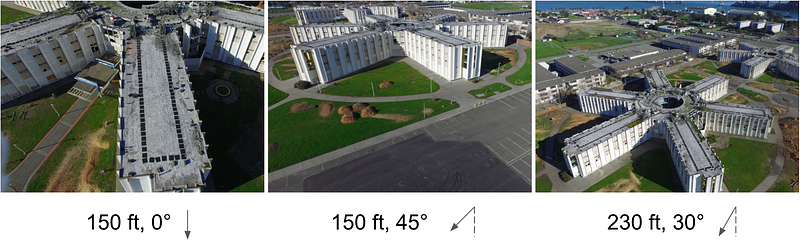
Example imagery from three of Jeff’s four flights

Step 4: Process the Imagery to Generate Your 3D Model

Once he finished flying, Jeff uploaded 504 photos from all four flights to DroneDeploy and chose to process the imagery as a “structure.” After a few hours, DroneDeploy’s cloud-based processing stitched all the images together and the 3D model was complete!
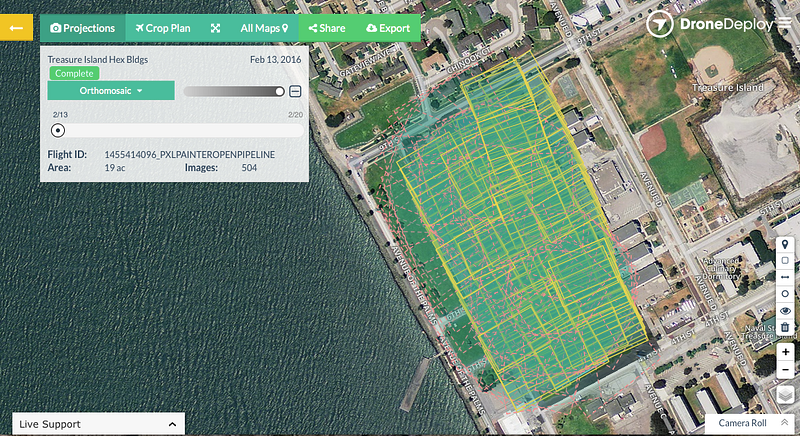
This view in DroneDeploy shows the coverage of photos used to generate the model. Images from the nadir flight are outlined in yellow, oblique images are outlined with pink dotted lines.

Explore the Completed 3D Model

Explore the interactive 3D model (below) or watch the fly-through video (further below).

DroneDeploy 3D model: Treasure Island
by DroneDeploy
on Sketchfab

Watch a 3D fly-through video of the abandoned Navy dorms.

The Most Common Mistake

Jeff said that one of the most common mistakes pilots make is that they’re “not consistent with what they’re shooting — it takes time to get proficient in flying and some don’t take the time to learn.” Elaborating further, Jeff said that novice pilots “may not get enough overlap between images or cover enough area if they’re flying manually.” [Click to tweet]

How do you avoid this mistake? “Practice, practice, practice!” Jeff recommends practicing in big wide open spaces or with flights way above the tree line. To ensure sufficient overlap between images, err on the side of taking images more frequently and covering more of the surface of the structure.

Commercial Applications for 3D Models

Drone enthusiasts aren’t the only ones using drones to make 3D models. Construction sites commonly use 3D models to evaluate the topography of a site, identify earthmoving needs, and to monitor progress of projects against project schedules. Other industries using drone-based 3D modeling include mining and inspection.

Jeff is excited about the potential uses for drone-based 3D models in environmental conservation. He has been experimenting with using drones to measure and model high and low tide along the bay. “You can see differences in 3D. You can see urbanization affecting erosion along the wetlands — that has important intrinsic value here and now,” said Jeff.

Jeff’s 3D Model of Refugio Creek, in Hercules, CA

Where to Learn More

To learn more about how to make 3D models with DroneDeploy, check out the 3D modeling with drones in our support documentation. Drone Coalition and Flite Test also include tutorials showing how to make 3D models with DroneDeploy. If you still have additional questions about making great 3D models, ask other flyers within the community forum.

Make Free 3D Models with DroneDeploy

It’s easy and free to start making 3D models with DroneDeploy. Just signup for an account or download our flight app on the App Store or Google Play.

 By Anya Lamb, Marketing Manager @DroneDeploy
Frank Schroth
Frank Schroth

Frank Schroth is editor in chief of DroneLife, the authoritative source for news and analysis on the drone industry: it’s people, products, trends, and events.
Email Frank
TWITTER:@fschroth

Filed Under: Applications, Industries Tagged With: 3D Imaging, DroneDeploy

Reader Interactions

Comments

  1. Marc Mulkey says

    January 30, 2017 at 7:55 am

    Great article. I am taking my business more toward these areas, especially the mining and inspection related fields. Drone Deploy is a fantastic tool.

    Reply
    • Royce Chisnall says

      January 31, 2017 at 3:32 am

      If you want any useable data then do not use a camera with a rolling shutter, such as a phantom or inspire 1. They will only give inaccurate pretty images.

      Reply

Trackbacks

  1. Tech Talk - Week of 6.14.2021 - ASMP says:
    June 17, 2021 at 2:26 pm

    […] 4 Steps for Making an Excellent 3D Model with a Drone […]

    Reply
  2. Steps to make an amazing 3D model using drones - Drone India says:
    November 3, 2019 at 9:47 am

    […] Read more here […]

    Reply
  3. 3D Models with sUAS/UAV | Icon Aerial Media says:
    January 2, 2017 at 8:20 am

    […] 4 Steps for Making an Excellent 3D Model With a Drone […]

    Reply

Leave a Reply Cancel reply

Your email address will not be published. Required fields are marked *

Primary Sidebar

LATEST

Six Takeaways from CIS White Paper on Drone Risks at Public Gatherings

As planning ramps up for the FIFA World Cup 2026, security agencies are preparing for one of the most complex…

Continue Reading Six Takeaways from CIS White Paper on Drone Risks at Public Gatherings

Matternet and SoftBank Robotics America Partner to Scale Drone Delivery Networks

Collaboration targets healthcare and enterprise logistics with focus on real-world deployment Matternet and SoftBank Robotics America have announced a strategic…

Continue Reading Matternet and SoftBank Robotics America Partner to Scale Drone Delivery Networks

FAA Reverses Course on Drone Flight Limits Near Federal Operations

FAA backs down on threat to prosecute drone pilots By DRONELIFE Features Editor Jim Magill The FAA has apparently backed…

Continue Reading FAA Reverses Course on Drone Flight Limits Near Federal Operations

Donecle Raises €10 Million to Expand Drone-Based Aircraft Inspection Platform

Funding will support international growth and further development of AI-driven maintenance solutions Donecle, a France-based company specializing in automated aircraft…

Continue Reading Donecle Raises €10 Million to Expand Drone-Based Aircraft Inspection Platform

Is the U.S. Ready for Drone Threats at World Cup Scale?

U.S. faces multiple challenges in counter-UAS buildup By DRONELIFE Features Editor Jim Magill (Editor’s note: This is part of a…

Continue Reading Is the U.S. Ready for Drone Threats at World Cup Scale?

FAA Moves to Close Drone Enforcement Gap with New DETER Program

As detection outpaces enforcement, the FAA introduces faster penalties for rule-breaking operators Detection Has Outpaced Enforcement Drone detection is no…

Continue Reading FAA Moves to Close Drone Enforcement Gap with New DETER Program

HYFIX Raises $15M to Build U.S.-Made Drone Chip Platform

New system-on-chip aims to replace fragmented electronics with a single secure architecture HYFIX Spatial Intelligence, Inc. has announced a $15…

Continue Reading HYFIX Raises $15M to Build U.S.-Made Drone Chip Platform

FCC Grants Conditional Approval to Sees.ai UAS, Signaling New Path for Foreign Drone Systems

Limited public details raise questions about “v.USA 1.0” and how international companies can meet U.S. security requirements The Federal Communications…

Continue Reading FCC Grants Conditional Approval to Sees.ai UAS, Signaling New Path for Foreign Drone Systems

UK Drone Package for Ukraine Signals Push to Scale Domestic Industry

Largest-ever MOD initiative supports Kyiv while strengthening UK drone manufacturing base As the global race to build sovereign drone capability…

Continue Reading UK Drone Package for Ukraine Signals Push to Scale Domestic Industry

What Are People Really Saying About the Commercial Drone Industry?

Industry survey will shape discussion on real-world challenges and opportunities in commercial drone operations Commercial UAV Expo has announced its…

Continue Reading What Are People Really Saying About the Commercial Drone Industry?

Secondary Sidebar

Footer

SPONSORED

Inspired Flight Gremsy IF800 VIO F1 drones geo week

What Will It Take to Strengthen U.S. Drone Manufacturing? A Conversation with Inspired Flight’s CEO

Global Mapper Mobile data collection

Collection Ground Control Points with Global Mapper Mobile

Military Drone Mapping Solutions

How SimActive’s Correlator3D™ is Revolutionizing Military Mapping: An Exclusive Interview with CEO Philippe Simard

Photogrammetry Accuracy Standards

SimActive Photogrammetry Software: Enabling Users to Meet Accuracy Standards for Over 20 Years

NACT Engineering Parrot ANAFI tether indoor shot

Smart Tether for Parrot ANAFI USA from NACT Engineering

Blue Marble, features global mapper, features Blue Marble

Check Out These New Features in Global Mapper v25 from Blue Marble

About Us | Contact Us | Advertise With Us | Write for Us | Privacy Policy | Terms of Service

The Trusted Source for the Business of Drones.

This website uses cookies and third party services. By clicking OK, you are agreeing to our privacy policy. ACCEPT

Manage consent

Privacy Overview

This website uses cookies to improve your experience while you navigate through the website. Out of these, the cookies that are categorized as necessary are stored on your browser as they are essential for the working of basic functionalities of the website. We also use third-party cookies that help us analyze and understand how you use this website. These cookies will be stored in your browser only with your consent. You also have the option to opt-out of these cookies. But opting out of some of these cookies may affect your browsing experience.
Necessary
Always Enabled
Necessary cookies are absolutely essential for the website to function properly. These cookies ensure basic functionalities and security features of the website, anonymously.
CookieDurationDescription
cookielawinfo-checkbox-analytics11 monthsThis cookie is set by GDPR Cookie Consent plugin. The cookie is used to store the user consent for the cookies in the category "Analytics".
cookielawinfo-checkbox-functional11 monthsThe cookie is set by GDPR cookie consent to record the user consent for the cookies in the category "Functional".
cookielawinfo-checkbox-necessary11 monthsThis cookie is set by GDPR Cookie Consent plugin. The cookies is used to store the user consent for the cookies in the category "Necessary".
cookielawinfo-checkbox-others11 monthsThis cookie is set by GDPR Cookie Consent plugin. The cookie is used to store the user consent for the cookies in the category "Other.
cookielawinfo-checkbox-performance11 monthsThis cookie is set by GDPR Cookie Consent plugin. The cookie is used to store the user consent for the cookies in the category "Performance".
viewed_cookie_policy11 monthsThe cookie is set by the GDPR Cookie Consent plugin and is used to store whether or not user has consented to the use of cookies. It does not store any personal data.
Functional
Functional cookies help to perform certain functionalities like sharing the content of the website on social media platforms, collect feedbacks, and other third-party features.
Performance
Performance cookies are used to understand and analyze the key performance indexes of the website which helps in delivering a better user experience for the visitors.
Analytics
Analytical cookies are used to understand how visitors interact with the website. These cookies help provide information on metrics the number of visitors, bounce rate, traffic source, etc.
Advertisement
Advertisement cookies are used to provide visitors with relevant ads and marketing campaigns. These cookies track visitors across websites and collect information to provide customized ads.
Others
Other uncategorized cookies are those that are being analyzed and have not been classified into a category as yet.
SAVE & ACCEPT



